If you've been following a tutorial on QAbstractTableModel and accidentally left out the line if role == Qt.DisplayRole: from your data method, you might have been greeted by something unexpected: checkboxes, checkmarks, and mysterious filled squares scattered across your table.
This is a great accident to make, because understanding why it happens gives you a much deeper insight into how Qt's Model/View architecture works behind the scenes.
What happened?
Here's a typical data method that formats values for display in a table:
def data(self, index, role):
    if role == Qt.DisplayRole:  # <-- this line was accidentally omitted
        # Get the raw value
        value = self._data[index.row()][index.column()]

        # Perform per-type checks and render accordingly
        if isinstance(value, datetime.date):
            return value.strftime("%Y-%m-%d")
        if isinstance(value, float):
            return "%.2f" % value
        if isinstance(value, str):
            return '"%s"' % value
        # Default (anything not captured above: e.g. int)
        return value
When you remove that if role == Qt.DisplayRole: guard, the code still runs without raising an error. But the table output looks like this:
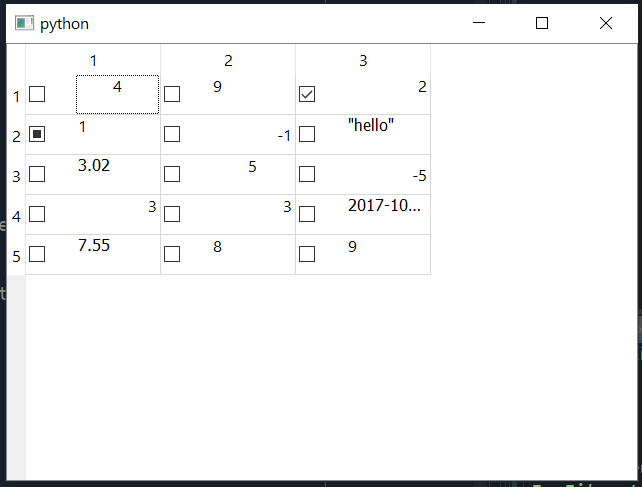
Checkboxes everywhere, some checked, some unchecked, and some showing a filled square. Let's figure out why.
How the data method actually works
The data method on a model is called by the view — repeatedly. Every time the view needs to know something about a cell, it calls data and passes two arguments:
index— tells you where (which row and column)role— tells you what the view is asking about
The role parameter is the piece that matters here. Qt doesn't just ask "what value should I display?" It also asks things like "what background color should this cell have?" or "should this cell show a checkbox?" Each of these questions is represented by a different role.
Some common roles include:
Purchasing Power Parity
Developers in [[ country ]] get [[ discount.discount_pc ]]% OFF on all books & courses with code [[ discount.coupon_code ]]| Role | What the view is asking |
|---|---|
Qt.DisplayRole |
"What text should I display?" |
Qt.BackgroundRole |
"What background color should I use?" |
Qt.ForegroundRole |
"What text color should I use?" |
Qt.CheckStateRole |
"Should I show a checkbox, and what state should it be in?" |
Qt.DecorationRole |
"Should I show an icon?" |
When the view renders a single cell, it calls your data method multiple times — once for each role it cares about. Your method is expected to check which role is being asked about and return an appropriate answer, or return None to say "I have nothing for that role."
What happens when you skip the role check
Normally, you nest your return values under if role == Qt.DisplayRole: so that your formatted strings are only returned when Qt is asking for display text. For all other roles, your method implicitly returns None (Python functions return None by default when they reach the end without an explicit return), and the view treats that as "nothing to do here."
When you remove that guard, your method returns the same value regardless of which role is being asked about. Qt asks "should I show a checkbox?" and your method hands back an integer. Qt asks "what background color?" and your method hands back a date string. You're answering every question with the same answer, and Qt does its best to interpret whatever you give it.
Why checkboxes appear
The most visually obvious result is the checkboxes, and that comes down to Qt.CheckStateRole.
When Qt calls your data method with role == Qt.CheckStateRole, it expects to receive a Qt.CheckState value in return. If you return None, no checkbox is shown. But since you removed the role check, your method returns the cell's actual data value instead.
Qt.CheckState is an enum with three possible values:
| Constant | Integer value | Meaning |
|---|---|---|
Qt.Unchecked |
0 |
Empty checkbox |
Qt.PartiallyChecked |
1 |
Checkbox with a filled square |
Qt.Checked |
2 |
Checkbox with a checkmark |
These enum values are just integers underneath. Qt.Unchecked == 0 is True. So when your data method returns an integer like 2 for Qt.CheckStateRole, Qt interprets that as Qt.Checked and draws a ticked checkbox.
You can verify this yourself with a simple experiment:
def data(self, index, role):
    if role == Qt.CheckStateRole:
        return 2  # Every cell shows a checked checkbox
Or to see the "partially checked" square:
def data(self, index, role):
    if role == Qt.CheckStateRole:
        return 1  # Every cell shows a filled square
Mapping the screenshot back to the data
Looking at the screenshot again, you can now explain each checkbox state by looking at the integer value in that cell:
- Cells showing a checkmark (✓) — the underlying data value is
2, which Qt interprets asQt.Checked. - Cells showing a filled square (■) — the underlying data value is
1, which Qt interprets asQt.PartiallyChecked. - Cells showing an empty checkbox — the data value is something other than
0,1, or2, but it's notNoneeither. Returning a non-Nonevalue forQt.CheckStateRoletells Qt "yes, show a checkbox," but since the value doesn't map to a recognized check state, it defaults to unchecked.
Cells that return strings, floats, or date objects for Qt.CheckStateRole still cause a checkbox to appear — any non-None return value is enough to trigger that — but the checkbox state falls back to unchecked because the value can't be interpreted as a valid Qt.CheckState.
The fix
The fix is straightforward: always check the role before returning data.
def data(self, index, role):
    if role == Qt.DisplayRole:
        value = self._data[index.row()][index.column()]

        if isinstance(value, datetime.date):
            return value.strftime("%Y-%m-%d")
        if isinstance(value, float):
            return "%.2f" % value
        if isinstance(value, str):
            return '"%s"' % value
        return value
By wrapping everything inside if role == Qt.DisplayRole:, you ensure that your formatted values are only returned when Qt is asking for display text. For every other role — Qt.CheckStateRole, Qt.BackgroundRole, and so on — your method returns None, which tells Qt "I have no special instructions for that."
Lessons from this happy accident
This kind of mistake is actually a great learning opportunity. It reveals several things about how Qt's Model/View system works:
-
The
datamethod is called multiple times per cell, once for each role the view is interested in. Your method needs to handle (or ignore) each role appropriately. -
Roles are just integers, and so are many Qt enums. When you return an integer for a role that expects an enum, Qt will happily interpret it according to that enum's values. This is how a data value of
2accidentally becomes a checked checkbox. -
Returning
Noneis meaningful. It tells the view "I have nothing to say about this." That's why the default behavior of Python functions (returningNonewhen no explicit return is hit) works perfectly as a "skip this role" mechanism. -
Always guard your return values with role checks. As you add more roles to your
datamethod (for colors, tooltips, alignment, and so on), keeping each block under its ownif role == ...:check ensures that your answers only go to the right questions.
Understanding this pattern makes it much easier to extend your models later. Want to add background colors? Add a block for Qt.BackgroundRole. Want tooltips? Add one for Qt.ToolTipRole. Each role is a separate conversation between the view and your model, and your data method is where you manage all those conversations. To see these concepts applied with real data using numpy and pandas, take a look at the QTableView with numpy and pandas tutorial. You can also learn more about signals, slots and events which are another core part of how Qt views communicate with your application.
PyQt6 Crash Course by Martin Fitzpatrick — The important parts of PyQt6 in bite-size chunks
